The following texts were partially or completely generated with the help of generative AI models.
Until now, creating a CDS-based OData service for a dynamic Fiori tile was simply impossible for me because I didn't know one small detail. The service requires a field named number, which unfortunately is a reserved keyword. Thanks to a blog post in the SAP Community by Andre Fischer earlier this week, that's no longer a problem. In this article, I want to demonstrate the approach using an example of such a service.
What are dynamic tiles
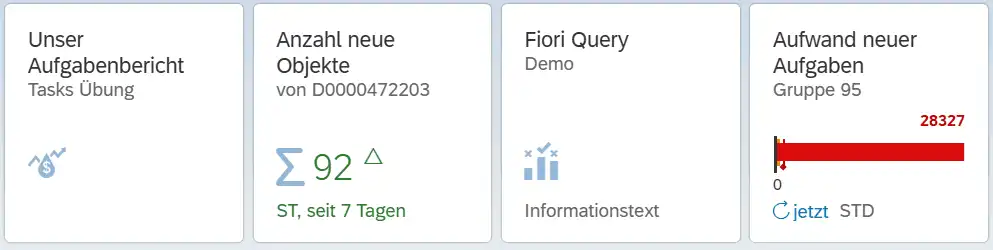
Every application in a Fiori Launchpad has a tile to launch it. The texts and icons can either be static or delivered dynamically from an OData service. Typical examples are key figures that are displayed prominently on the tile and may also have a color highlight (red/green/yellow).
The problem with services
For displaying the key figure, the service requires a field with the identifier number. This is not possible as a field name in CDS objects, because then the syntax check reports: "NUMBER" is a reserved word. (choose an other fieldname).

But unfortunately, we need exactly this field name. The SAP documentation is unambiguous here. Here are all the allowed fields for the service:
icon- an SAP icon in the format that the SAP IconExplorer provides us, e.g.sap-icon://address-bookinfo- a text below the key figureinfoState- semantic color for the info. Allowed values areNegative(red),Neutral- the default value,Positive(green) andCriticalnumber- the key figure to be displayednumberDigits- number of decimal places of the key figurenumberFactor- factor for how the key figure should be displayed: k, M, % etc.numberState- semantic color for the key figure. Allowed values areCritical(yellow),Error(red),Good(green),Neutral- the default value andNone.numberUnit- unit of measurestateArrow- trend indicator - allowed values areNone,UpandDown.subtitle- subtitle of the tiletitle- title of the tile
All of these properties can be supplied from the service. They override the statically defined values when they are delivered by the service.
Creating the dynamic service
The crux of the matter is therefore the name of the field with the key figure in the service. This must be number, which is not allowed as a field name in CDS. However, with the annotation
@odata.property.name: 'Number'
we can define an alternative field name for an OData service. This then gives us a valid service that supplies our dynamic tile with data. Here is a simple example:
@AccessControl.authorizationCheck: #NOT_REQUIRED
@EndUserText.label: 'Dynamic Tile DAta'
/*+[hideWarning] { "IDS" : [ "KEY_CHECK" ] }*/
define view entity zc_dynamic_tile
  as select from tadir
{
  key '1'                   as KeyField,
      'sap-icon://sum'      as icon,
      'seit 7 Tagen'        as info,
      case
        when count(*) > 20 then 'Good'
        when count(*) < 3  then 'Error'
        else 'Neutral'
      end                   as infoState,
      @OData.property.name: 'number'
      count(*)              as numberValue,
      0                     as numberDigits,
      ''                    as numberFactor,
      case
        when count(*) > 20 then 'Good'
        when count(*) < 3  then 'Error'
        else 'Neutral'
      end                   as numberState,
      'ST'                  as numberUnit,
      'Up'                  as stateArrow,
      concat_with_space(
        'von',
        $session.user,
        1       )                     as subtitle,
      'Anzahl neue Objekte' as title
}
where
      author     = $session.user
  and created_on > dats_add_days(
                     $session.system_date,
                     -7,
                     'NULL'  );
Configuring the dynamic tile with the CDS-based OData service
Based on the CDS view, I created a service definition and a service binding:
@EndUserText.label: 'Dynamic Tile '
define service Zdynamic_Tile_Service {
  expose zc_dynamic_tile as config;
}
After local publishing, I have the following relative URL:
/sap/opu/odata/sap/ZDYNAMIC
The service only needs to return one record. This should not be delivered as an EntitySet but as a single record. For this, the artificial key
key '1' as KeyField,
was added to the view. With the URL
/sap/opu/odata/sap/ZDYNAMIC('1')
we get exactly this one record. This relative URL is entered in the configuration of the dynamic tile:
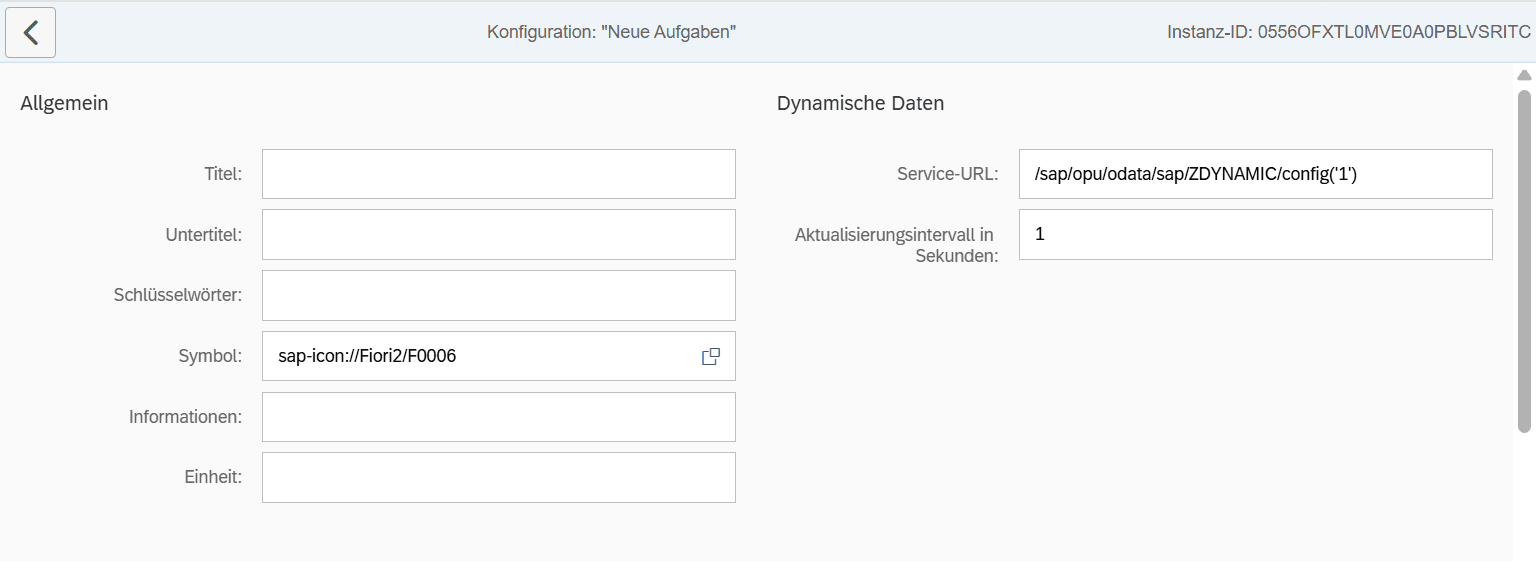
Since our service supplies all fields, the fields title, subtitle etc. do not need to be filled in.
The result: A dynamic Fiori Launchpad tile
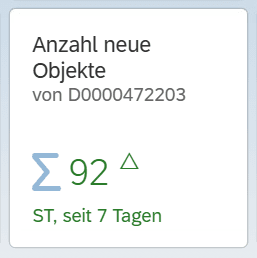
This tile displays the number of development objects a user has created in the object catalog (TADIR) in the last 7 days. If there are more than 20, the color is displayed in green.
Conclusion - Dynamic tiles can be created very easily with CDS-based OData services
The effort for a dynamic tile is relatively low. In most cases, suitable CDS views that deliver the right key figures already exist. Add a CASE to provide the semantic colors and the service is done. So there is hardly any reason left for boring, static tiles.
Useful links
SAP Community
How to use reserved words as property names in your OData service?
SAP Dokumentation
Response Values for Dynamic Tiles