The following texts were partially or completely generated with the help of generative AI models.
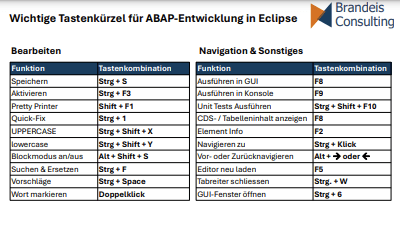
There are many lists of shortcuts for ABAP development in Eclipse ADT. But often they are so long and cluttered that you don't want to print them. Or if you do, you need a magnifying glass. Here are my favorites. Short and relevant. But certainly not complete.
Essential ADT Shortcuts
Editing
| Function | Keyboard shortcut |
|---|---|
| Save | Ctrl + S |
| Activate | Ctrl + F3 |
| Pretty Printer | Shift + F1 |
| Quick fix | Ctrl + 1 |
| UPPERCASE | Ctrl + Shift + X |
| lowercase | Ctrl + Shift + Y |
| Toggle block mode | Alt + Shift + A |
| Find & replace | Ctrl + F |
| Suggestions | Ctrl + Space |
| Select word | Double click |
Execution & Navigation
| Function | Keyboard shortcut |
|---|---|
| Run in GUI | F8 |
| Run in console | F9 |
| Run unit tests | Ctrl + Shift + F10 |
| CDS or table contents | F8 |
| Element info | F2 |
| Navigate to definition | Ctrl + Double click |
| Navigate forward or back | Alt + 🡪 or Alt + 🡨 |
| Reload file in editor | F5 |
| Close tab | Ctrl + W |
| Open GUI window | Ctrl + 6 |
If you're missing something important, let me know!
Download as PDF
Download as PDF