The following texts were partially or completely generated with the help of generative AI models.
The nine hells of the cache
As already described in the blog post UI5/Fiori und der Cache by Johann Fößleiter from Cadaxo, there are many caching mechanisms in the world of UI5 and Fiori that like to make your life difficult. Today one mechanism became clearer to me that likes to and frequently contributes to developers' suffering, and how to fix it.
SAP-CONTEXT-TOKEN
Many a developer knows it: changes to annotations sometimes have no impact on the deployed Fiori Elements application. But if you look at the preview via Eclipse/ADT, it works right away - why is that?
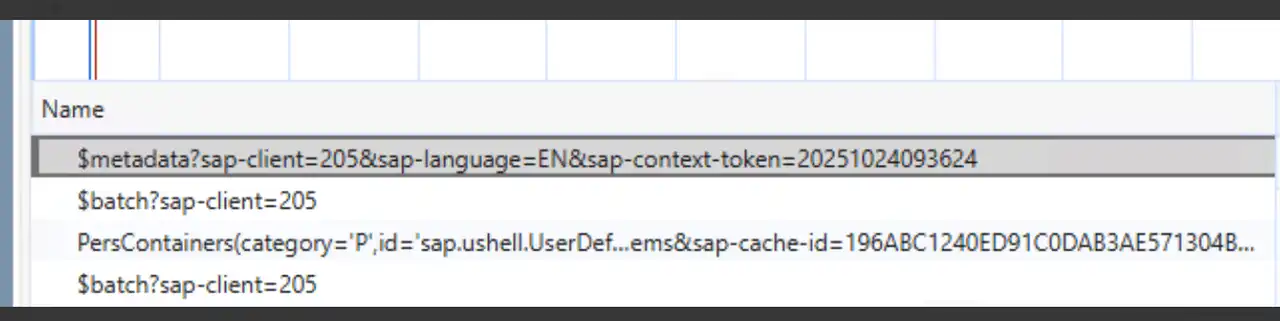
One thing that has ruined my last few days - the title of the blog post is quite justified - is the sap-context-token. It becomes apparent when you look at the metadata call that is triggered from the launchpad. It then looks like this:
$metadata?sap-client=100&sap-language=EN&sap-context-token=20251024093624
The important part here are the last characters - the token. It serves caching for good performance in production, but in development I'd rather wait 2 seconds longer and see my new coding instead.
Origin
The report /UI5/UPD_ODATA_METADATA_CACHE builds up a caching here, which can also make sense. In the report description it is also recommended to schedule an hourly job for this - and as long as the cache is there, the display is only refreshed hourly - not what we as developers want!
Solution
In two simple steps life becomes better:
- Delete (have deleted) the scheduling of the job
- Run the report **/UI5/DEL_ODATA_METADATA_CACHE which deletes the existing cachings
...and that's how easy it is to save the day. :-)