The following texts were partially or completely generated with the help of generative AI models.
A question just came up in the DSAG forum that I would like to answer here in public and in a way that Google can find. This problem certainly occurs quite often.
"In an internal table, I have content in the rows that the debugger displays in hexadecimal as
A000. The table is created / uploaded via the function moduleTEXT_CONVERT_XLS_TO_SAP... What does this hex code mean? Are there any similar ones... In the ABAP program, several cells are pieced together via Concatenate (academic title, first name and last name). When the academic title has this value (A000), where does it come from... Which values could you perhaps replace with space and how...."
Big and little endian
If you search for A000 in Unicode tables, you only find one character "ꀀ" that you wouldn't expect. This is due to the little & big endian problem, see Wikipedia byte order. I had really hoped that in the year 2024 you wouldn't have to deal with this anymore. Well, I was clearly mistaken.
An invisible villain
In fact, you have to reverse the bytes so that it becomes 00A0. Then it turns out to be a no-break space, aka. NBSP. It is often used when you want to prevent a line break in HTML. It looks like a space, but it keeps causing problems in SAP. I've had a lot of fun with this thing in BW, see also my article about the invalid characters in BW
Validating in the debugger
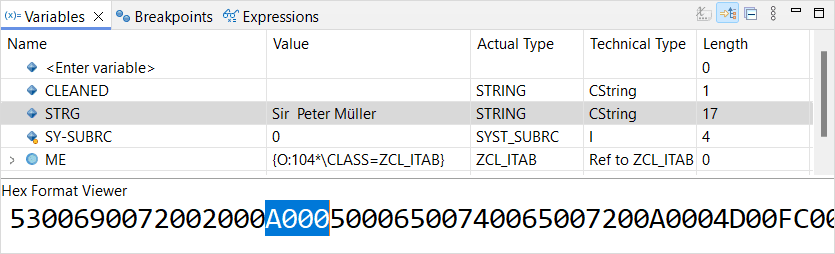
Since you cannot enter the NBSP in Eclipse, I had to set the value of a variable in the debugger and then display it in HEX mode:
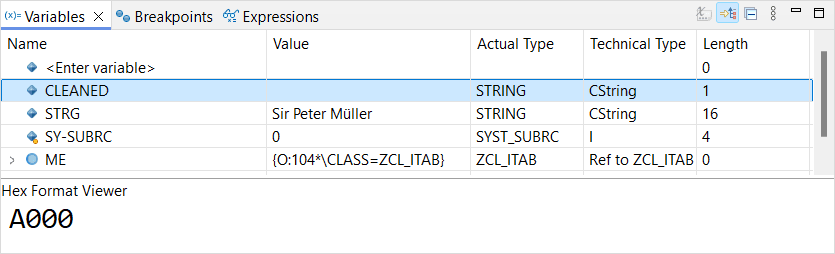
Here you can nicely see that this is the A000 we were looking for.
And now search/replace
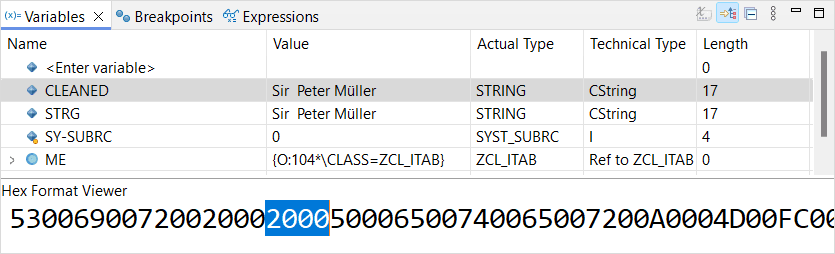
With the ABAP function REPLACE, you can quickly replace the troublemaker with a proper space.
    data(cleaned) = replace( pcre = '\x{00A0}'
                             val = strg
                             with = ` `
                             occ   =   0 ).
I hope this helps.
Best regards & have a nice weekend,
Jörg