The following texts were partially or completely generated with the help of generative AI models.
As of SAP BW 7.50, it is possible to implement query variables using a SAP HANA exit in SQLScript. This allows the variable to be prefilled or calculated without involving the ABAP stack. I have not yet described this approach in the current edition of my book "SQLScript for SAP HANA", which is why I want to make up for it here.
The major advantage of these query variables is that the execution can take place entirely within SAP HANA. This makes it possible to use the variable logic in the external views generated for a query as well. The processing type SAP HANA exit is only possible for characteristic variables with exactly one value. These can be created in the BW modeling tools in BW. The corresponding code is stored in an AMDP class that implements the BAdI RSROA_VAR_HANA_EXIT_BADI. Beforehand, a corresponding implementation of the enhancement spot RSROA_VARIABLES_HANA_EXIT must be carried out. This procedure is explained at the end of this post under "Implementing the enhancement spot RSROA_VARIABLES_HANA_EXIT".
The processing time of the exit depends on whether the variable is ready for input. In the case of a variable that is ready for input, the exit calculates a proposed value before the parameter screens are displayed. If the variable is not ready for input, the exit is processed after the input variables have been entered. The logic in the exit can be based on this accordingly.
Description of the concept
One exit to calculate them all
Unfortunately, the concept of the SAP HANA exits for query variables is again strongly reminiscent of the old, ABAP-based approach. Here, there was exactly one exit for all variables. Accordingly, some form of branching was then required, depending on which variable was to be filled at the time.
The same concept was also implemented in the SAP HANA variant. This means that it is always necessary to query for which variable the values are to be obtained. But at least there can be multiple BAdI implementations.
The AMDP methods
IF_RSROA_VAR_HANA_EXIT~PROCESS
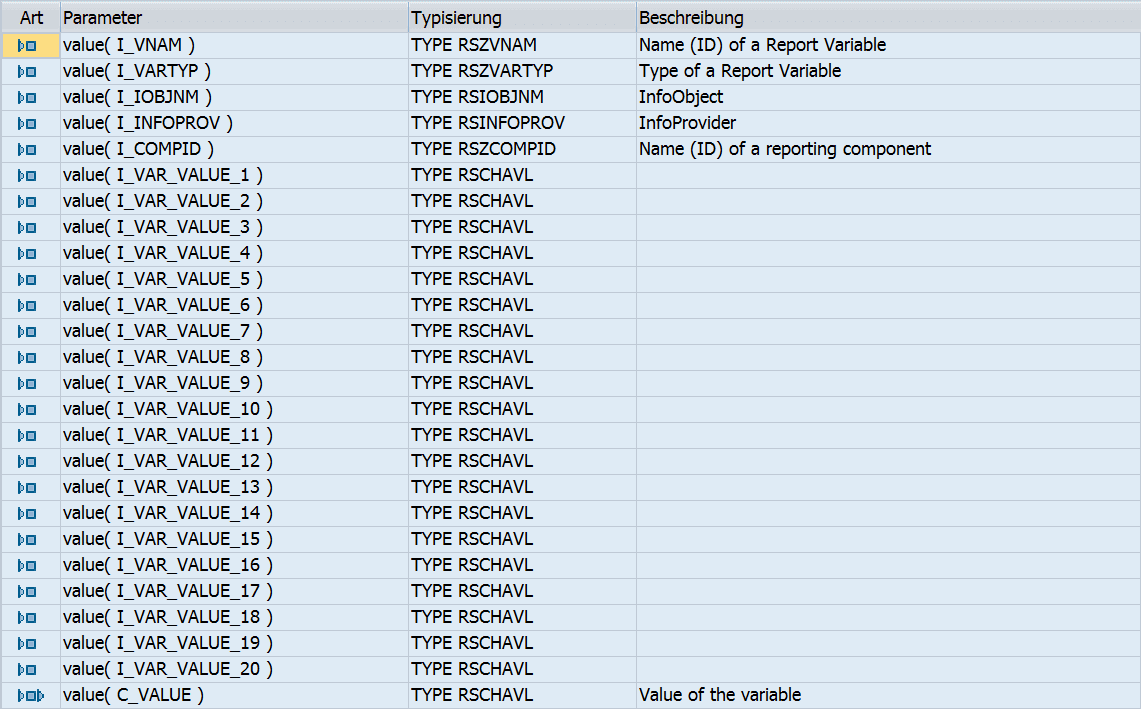
The AMDP method PROCESS calculates the value of the variable and returns it in the parameter C_VALUE. For this purpose, the information from the IMPORT parameters can be used. However, the parameters with the other variables are kept relatively generic. You can also see this clearly in the screenshot showing the signature of the method:
As of SAP BW 7.50, it is possible to implement query variables using a SAP HANA exit in SQLScript. This allows the variable to be prefilled or calculated without involving the ABAP stack. I have not yet described this approach in the current edition of my book "SQLScript for SAP HANA", which is why I want to make up for it here.
The major advantage of these query variables is that the execution can take place entirely within SAP HANA. This makes it possible to use the variable logic in the external views generated for a query as well. The processing type SAP HANA exit is only possible for characteristic variables with exactly one value. These can be created in the BW modeling tools in BW. The corresponding code is stored in an AMDP class that implements the BAdI RSROA_VAR_HANA_EXIT_BADI. Beforehand, a corresponding implementation of the enhancement spot RSROA_VARIABLES_HANA_EXIT must be carried out. This procedure is explained at the end of this post under "Implementing the enhancement spot RSROA_VARIABLES_HANA_EXIT".
The processing time of the exit depends on whether the variable is ready for input. In the case of a variable that is ready for input, the exit calculates a proposed value before the parameter screens are displayed. If the variable is not ready for input, the exit is processed after the input variables have been entered. The logic in the exit can be based on this accordingly.
Description of the concept
One exit to calculate them all
Unfortunately, the concept of the SAP HANA exits for query variables is again strongly reminiscent of the old, ABAP-based approach. Here, there was exactly one exit for all variables. Accordingly, some form of branching was then required, depending on which variable was to be filled at the time.
The same concept was also implemented in the SAP HANA variant. This means that it is always necessary to query for which variable the values are to be obtained. But at least there can be multiple BAdI implementations.
The AMDP methods
IF_RSROA_VAR_HANA_EXIT~PROCESS
The AMDP method PROCESS calculates the value of the variable and returns it in the parameter C_VALUE. For this purpose, the information from the IMPORT parameters can be used. However, the parameters with the other variables are kept relatively generic. You can also see this clearly in the screenshot showing the signature of the method:
In addition to the usual information from the context of the variable, the values of up to 20 other variables are also passed into this exit. Which ones exactly depends in turn on the other exit.
IF_RSROA_VAR_HANA_EXIT~GET_PROPERTIES
This AMDP procedure provides, for each variable of type SAP HANA exit, the appropriate mapping of other variables to the parameters I_VAR_VALUE_XX of the AMDP procedure PROCESS. The signature for this looks as follows:
The table C_TS_VNAM_INDEX consists of two columns:
- VNAM is the name of the variable whose value is to be passed to PROCESS
- INDEX is the associated number XX of the parameter I_VAR_VALUE_XX
In addition, this SAP HANA exit is also called to determine whether the implementation is active at all for a combination of reporting component (I_COMPID) and variable (I_VNAM). The flag C_IS_ACTIVE is filled accordingly.
A simple example of a SAP HANA exit for a query variable
The editing of the source code of AMDP procedures always takes place in the ABAP Development Tools (ADT) in the Eclipse development environment. The following example builds the variable ZJB_CONCAT by concatenating the two variables ZJB_VAL1 and ZJB_VAL2 with the prefix "Concatenated: ".
The associated variables are created in the BW modeling tools. For ZJB_CONCAT it is important to select the processing type SAP HANA exit:
After that, for our example, the ready-for-input setting must be switched off, since we refer to two variables that are ready for input.
Implementing the enhancement spot RSROA_VARIABLES_HANA_EXIT
Time required: 20 minutes.
The enhancement spot RSROA_VARIABLES_HANA_EXIT must be implemented exactly once. To do this, an enhancement implementation is created, and a BAdI along with the associated BAdI class is implemented. The procedure is described below.
-
Implementing the enhancement spot**
Call transaction SE80 and select the enhancement information system. Select the object type enhancement spot and enter the name RSROA_VARIABLES_HANA_EXIT.
Right-clicking on the name opens a context menu (see screenshot). Select Implement there.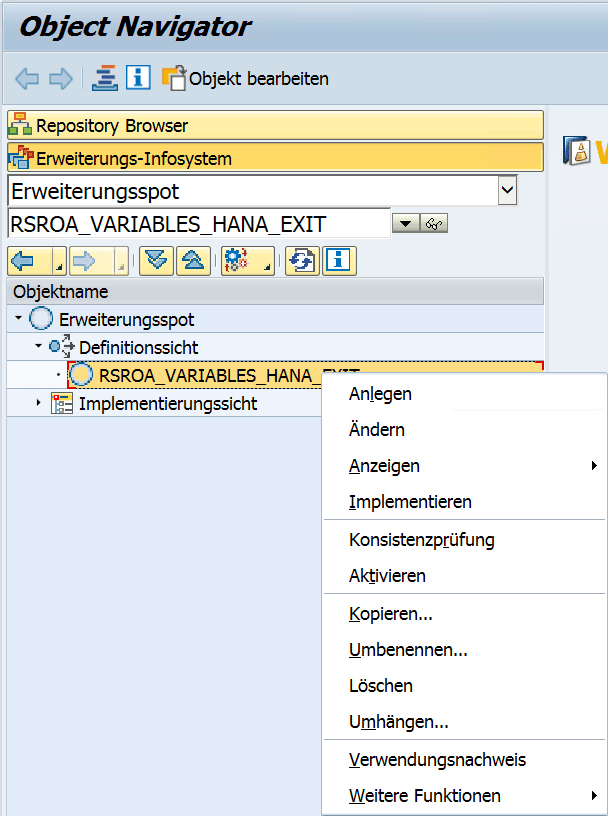
-
Enter information for the enhancement implementation
Enter a name for the enhancement implementation

-
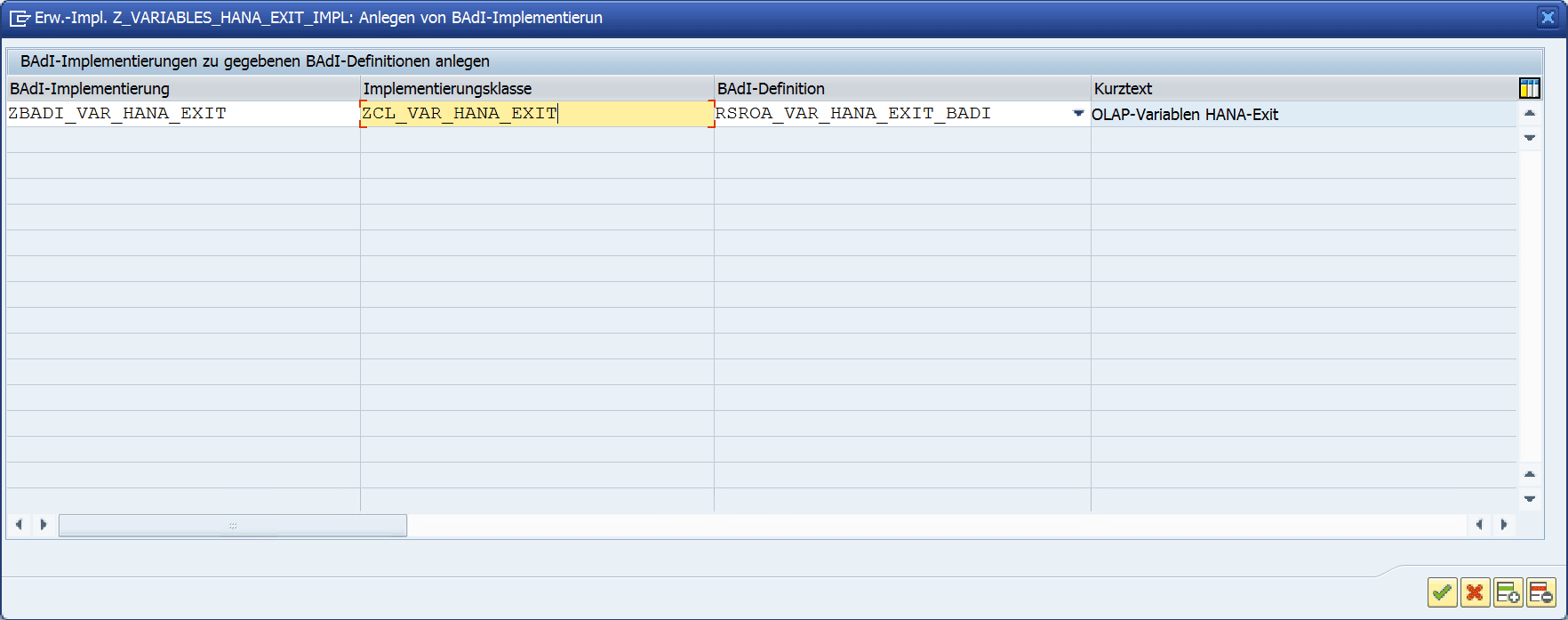
Create the implementation of the BAdI RSROA_VAR_HANA_EXIT_BADI
Next, you have to create the BAdI implementation. To do this, enter a suitable name for the BAdI implementation and the class to be generated in the window.
-
Create the implementation class for the interface IF_RSROA_VAR_HANA EXIT
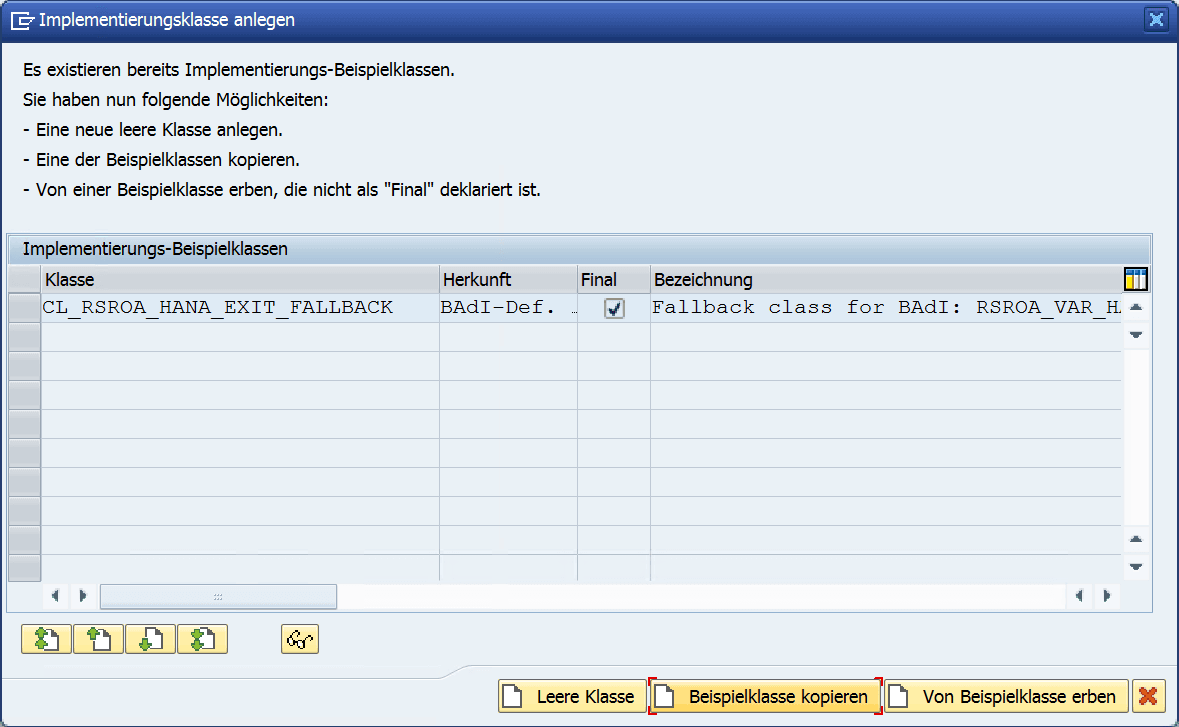
In the following pop-up, please select that the example class is to be copied. This way, you already have all the necessary interfaces along with some example code in your BAdI class.
-
Activate the enhancement implementation
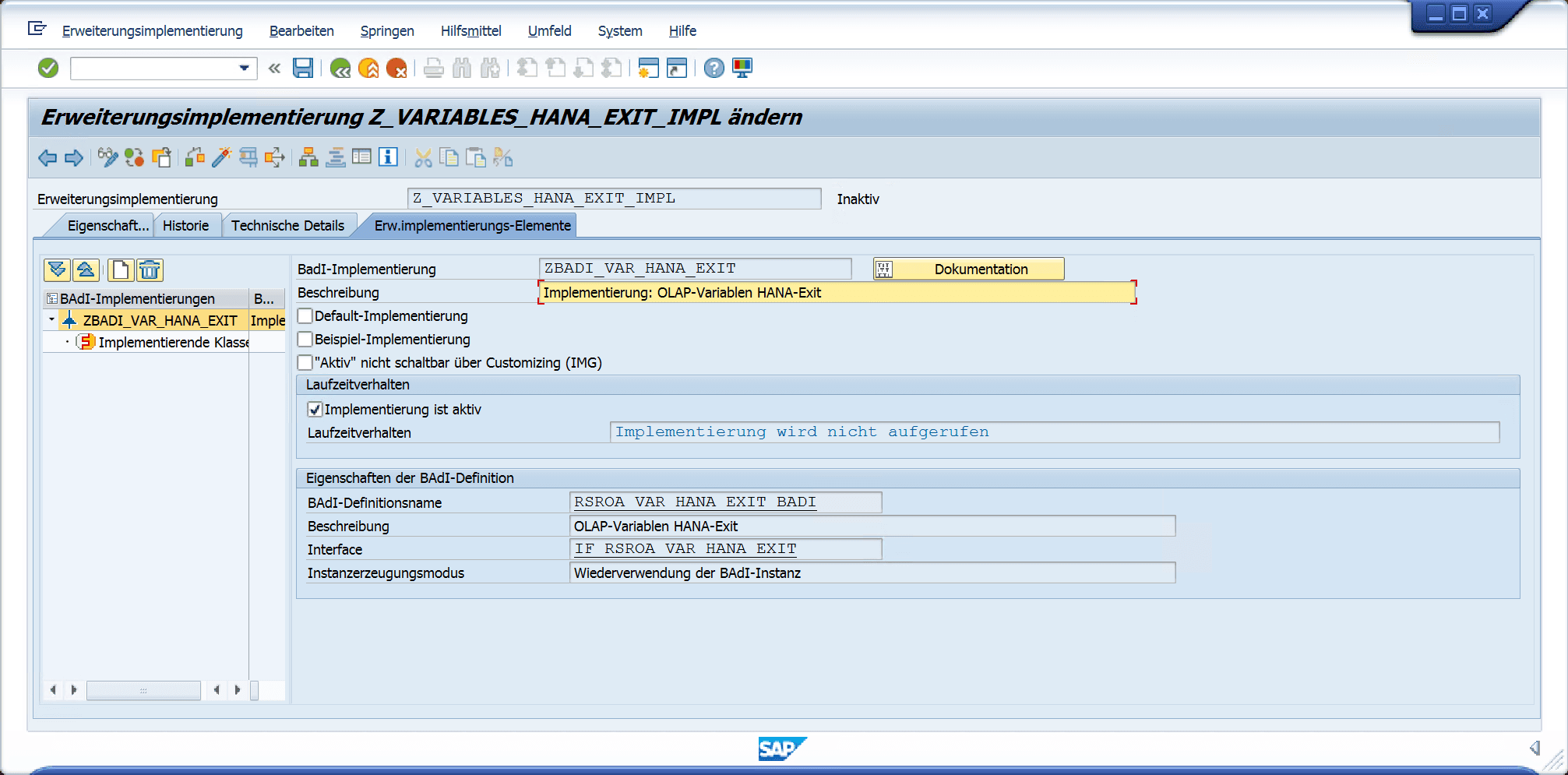
Now all you have to do is activate your enhancement implementation along with the BAdI class.
-
Check the status of the enhancement implementation
Using the checkbox, you can define whether your enhancement implementation should be active. The current status is shown below it.