The following texts were partially or completely generated with the help of generative AI models.
A common problem in SQL (and therefore also in CDS ABAP) is looking up individual data from another table (referred to here as the lookup table) without the data being multiplied out. As long as there is a :1 relationship, the solution with a normal join is trivial. But if several records qualify, i.e. it is a :N relationship, things get more difficult. However, there are a few simple solution patterns for this.
An example from the demo data model of "SQLScript for SAP HANA"
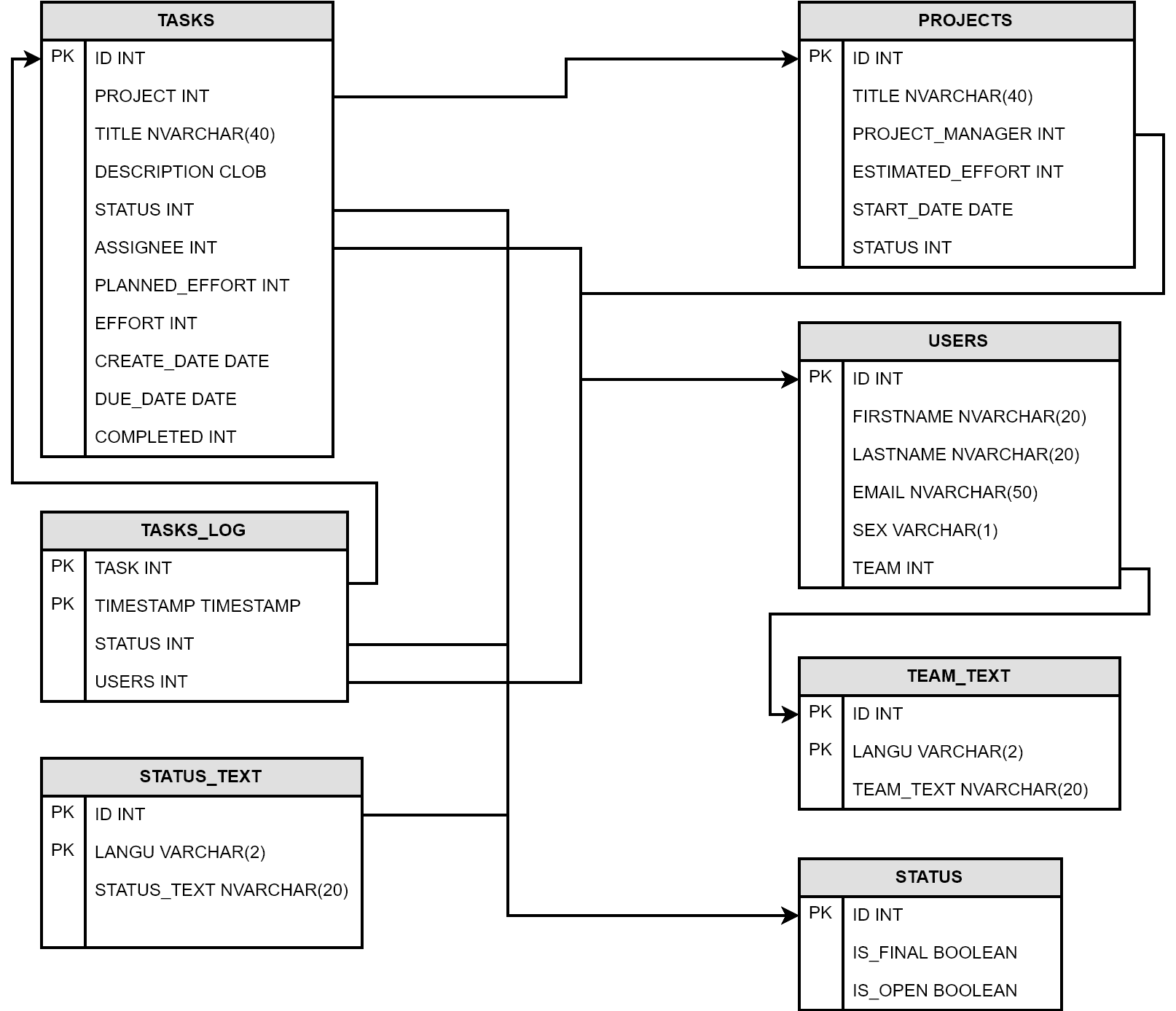
The following example refers to the demo data model used in the English edition of the book SQLScript for SAP HANA. It deals with task management. Each user (table USERS) has multiple tasks (lookup table TASKS). So when we run queries on the users and additionally add information from the tasks, we have exactly the situation described.
Undesirable: SELECT query with multiplication
This query shows what we do not want. Namely, that all tasks are read for each user and thus each user occurs N times.
SELECT u.id AS UserID,
       u.firstname,
       u.lastname,
       t.id AS TaskID,
       t.due_date
  FROM users AS u
  LEFT OUTER JOIN tasks AS t
  ON u.id = t.assignee;
The UserID is the key of the users table, the TaskID is the key of the tasks. And in the result on the right we can see how they multiply out. That is, each user occurs multiple times.
Result of the query
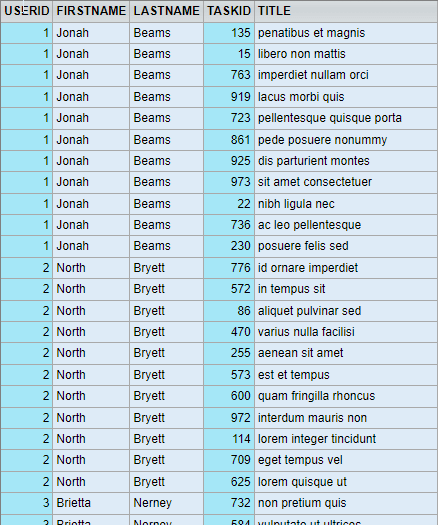 ...a total of 1000 records for 30 possible assignees
The solution approaches
It is important to always take the following cases into account:
- There is no record in the lookup table - If this can happen, you have to decide between
INNERandLEFT OUTER JOIN, depending on whether or not filtering should occur here. If not, theNULLvalues may have to be post-processed. I deliberately did not do this in the solution approaches below, so that you can see thatNULLmay occur. - There is exactly one matching record in the lookup table - This must be delivered.
- There are several matching records in the lookup table - Here we somehow have to settle on one. This is the actual topic of this article.
As always in SQL, it is possible to solve the requirement in one large query. But on the one hand, this is not quite as clear. And on the other hand, all solutions consist of a common partial solution:
We need a query (i.e. a table variable or CDS view) that delivers exactly one record for each key
By key I mean the key of the source table, in our case the user ID. Then we can easily solve the actual problem with a LEFT OUTER JOIN. In the following I show three ways in which we can create such a query. This is always assigned to the table variable ONE_TASK_PER_USER.
1. Using aggregate functions
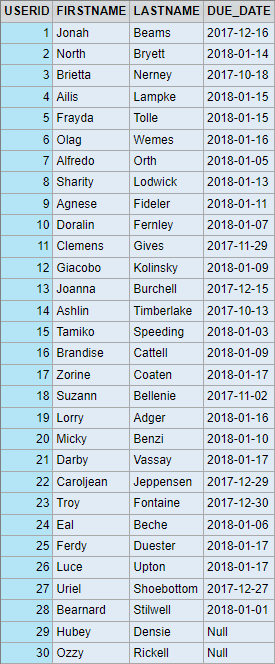
If we are only interested in one column of the table, we can use the aggregate functions MIN() or MAX() to add the largest or smallest value per key. We can also use these if the value is the same for all rows. The main thing is that we get only one occurrence. We can also aggregate data from multiple records, for example by concatenating strings with STRING_AGG.
DO BEGIN

  one_task_per_user = SELECT assignee,
                             max(due_date) AS due_date
                        FROM tasks
                      GROUP BY assignee;

  SELECT u.id AS UserID,
        u.firstname,
        u.lastname,
        t.due_date
    FROM users AS u
    LEFT OUTER JOIN :one_task_per_user AS t
    ON u.id = t.assignee
    ORDER BY UserID;

  END;
2. Any record: With a subquery on the key in the WHERE clause
If we want to look up several columns of the table, then of course all columns per assignee must come from the same record. This means the first approach no longer works. Instead, we can restrict the data in the WHERE clause per task assignee.
In the simplest case, we can do this with a subquery on the highest or lowest key value (here the ID) per assignee. This is perhaps a bit arbitrary or random, but in any case it is unambiguous.
DO BEGIN

  one_task_per_user =
    SELECT *
    FROM tasks AS o
    WHERE id = (SELECT MAX(id)
                  FROM tasks AS i
                 WHERE i.assignee =  o.assignee);

  SELECT u.id AS UserID,
        u.firstname,
        u.lastname,
        t.id AS TaskID,
        t.due_date,
        t.title
    FROM users AS u

    LEFT OUTER JOIN :one_task_per_user AS t
    ON u.id = t.assignee

    ORDER BY UserID;

END;
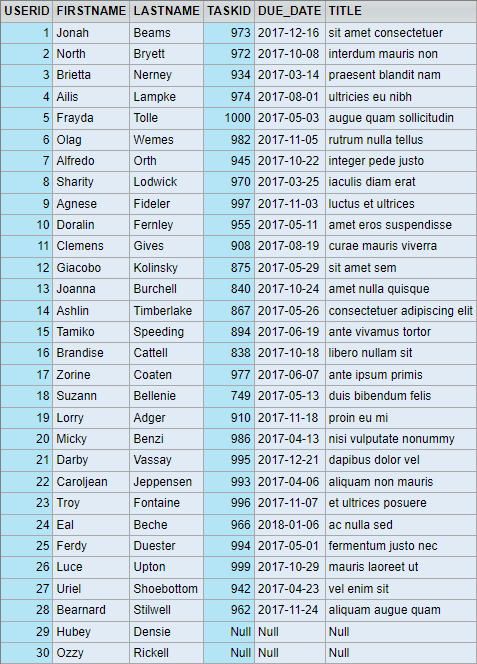
It is important that we ensure in the WHERE clause that exactly one record is found per assignee.
3. Any record with the highest due date per assignee
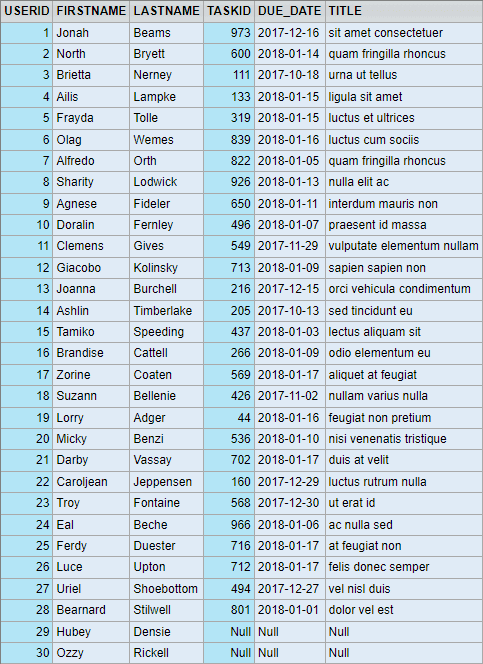
However, the last sentence in the previous section is not always so easy to fulfill. If, for example, we want to select the task with the highest due date, then it becomes more complex. Because there can be more than one task per assignee to which this applies. This means we need an intermediate step:
- First, we need a table with the tasks that have the highest due date per assignee. Here
TASKS_WITH_MAX_DD - From this we then have to select a record more or less arbitrarily, as above.
DO BEGIN

  tasks_with_max_dd =
    SELECT *
    FROM tasks AS o
    WHERE due_date =
             (SELECT MAX(due_date)
                FROM tasks AS i
               WHERE i.assignee =  o.assignee);

  one_task_per_user =
    SELECT *
    FROM tasks AS o
    WHERE id = (SELECT MAX(id)
                  FROM :tasks_with_max_dd AS i
                 WHERE i.assignee =  o.assignee);

  SELECT u.id AS UserID,
        u.firstname,
        u.lastname,
        t.id AS TaskID,
        t.due_date,
        t.title
    FROM users AS u

    LEFT OUTER JOIN :one_task_per_user AS t
    ON u.id = t.assignee

    ORDER BY UserID;

END;
And in CDS?
The examples refer to SQLScript, i.e. they can be implemented exactly like this in the SQL console or in AMDP. If we need this logic in CDS ABAP, then we have to deal with the current restrictions and differences between CDS and SQLScript. These are:
SELECT *is not possible. We have to name the fields individually.- Table variables only exist with CDS table functions, because these are AMDP functions. If we want to stay with CDS views or CDS view entities, then we have to create several CDS views instead.
- In CDS views and CDS view entities there is no option for subqueries in
WHEREclauses, see SAP documentation. Nevertheless, the shown logic for filtering is possible. It is just that instead a CDS view has to be created for each subquery and this must be used with anINNER JOINfor filtering. Unfortunately, this is not nice. The following example shows the necessary CDS views:
View for filtering the latest due date per assignee
DEFINE VIEW cds1 AS
SELECT FROM tasks
{
  assignee,
  MAX(due_date) AS max_dd
}
  GROUP BY assignee;
Filtering the tasks with this via INNER JOIN
DEFINE VIEW cds2 AS

SELECT FROM tasks AS t

INNER JOIN :cds1 AS filter
        ON t.assignee = filter.assignee
       AND t.due_date = filter.max_dd;
{
  t.assignee,
  t.id,
  t.due_date,
  t.title
}
View for unambiguously selecting one task per assignee
DEFINE VIEW cds3 AS

SELECT FROM cds2
{
  MAX(id) as max_id,
  assignee
}
  GROUP BY assignee;
Filtering the tasks via INNER JOIN
DEFINE VIEW cds4 AS

SELECT FROM cds2 AS t

INNER JOIN cds3 AS filter
   ON t.assignee = filter.assignee
  AND t.id = filter.max_id

{
  t.assignee,
  t.id,
  t.due_date,
  t.title
}
JOIN of the unambiguous tasks to the user data
DEFINE VIEW cds5 AS
  SELECT FROM users AS u

  LEFT OUTER JOIN CDS4 AS t
    ON u.id = t.assignee
{
   u.id AS UserID,
        u.firstname,
        u.lastname,
        t.id AS TaskID,
        t.due_date,
        t.title
}
    ORDER BY UserID;
We can clearly see that an implementation with CDS is no longer as elegant. In the end we have to create 5 views for this logic.
Conclusion
When looking up data, the selection of the appropriate record is not always easy. It makes sense to proceed in multiple stages in order to ultimately create a table with a single, unambiguous record per key. This allows even more complex requirements to be solved. CDS is not as elegant as SQLScript for such nested requirements, but it works.